

Last time I wrote about tracing one user's bug report through APM, logs, and our actual application code, when no alert had fired and nobody else had said a word. Four steps: query a tight window around the timestamp, correlate to logs by trace and entity, map it to the method, then decide whether it is benign or a real bug.
I ended that post by saying I would show how my Claude files are set up to make all of that run from a single prompt. This is that post.
The prompt is this:
/investigate-incident issue id: 12345678-1234-5678-abcd-efghijklmnop
Claude looks up the issue, works out which New Relic account it belongs to, runs the queries, reads the code, and comes back with a finding I can act on. It runs on 69 lines of configuration and one skill.
Triaging one of these by hand runs 10 to 60 minutes depending on how tangled the data is, and a complex single-user issue can take multiple hours. Going through the skill that packages all the steps this way cuts the investigation down to below five minutes.
Small Caveat The alert URL opens the alerts page. When more than one condition is active, Claude cannot tell which alert I mean, so I give it the issueId the alert emits. The URL is still the easiest thing to share with co-workers.
What Claude Needs
Claude needs three things from whatever you use for observability. New Relic makes all three easy for us.
The first is a way to ask questions. Claude talks to New Relic through an MCP server with an API key, so it can run the same queries I would run by hand. Any tool with an API or a CLI can fill that role.
The second is something that ties a failing request to its log lines. For us that is the trace ID. The New Relic agent attaches it to the transaction and to the log lines written during that request, so matching them up is a single query. Without a shared ID like that, Claude falls back to lining things up by service name and time, which works but is a lot less certain.
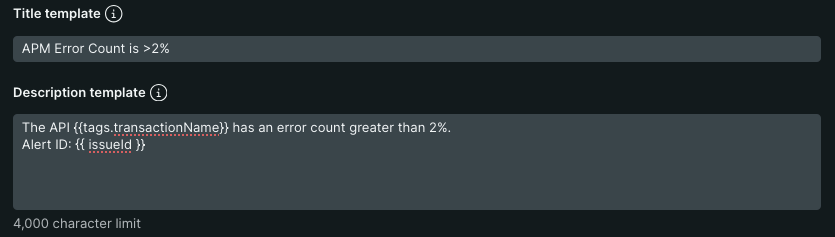
The third is an identifier that points at exactly one alert. We added the issueId to the alert's description template, which is the screenshot above, so every alert that fires carries the value I paste into the prompt.
The Files
My user-level config is five files. The top-level one, ~/.claude/CLAUDE.md, is sixteen lines and gives no instructions of its own. It is an index, and these are the four entries that matter here:
# Personal Context
See @~/.claude/rules/identity.md for role and stack details.

# Preferences
See @~/.claude/rules/preferences.md for how I like work done.

# Workflow
See @~/.claude/rules/workflow.md for plan-mode, commit, and tool habits.

# New Relic
See @~/.claude/rules/newrelic.md for NR querying rules and known gotchas.
The four files it points at are small too:
~/.claude/rules/
├── identity.md      8 lines   role, stack, what I read vs write
├── preferences.md   7 lines   guardrails on destructive actions
├── workflow.md     10 lines   plan first, commit conventions
└── newrelic.md     28 lines   domain gotchas
Sixty-nine lines, loaded into every session. The roughly 515 lines that run an investigation live in the skill and load only when it runs.
Where my code lives is a separate layer, kept in the workspace instead of ~/.claude:
~/Code/
├── CLAUDE.md            the index: which folder is which project
├── <project>/
│   └── CLAUDE.md        subsystem to repo mapping, ADO org, conventions
└── <project>/
    └── CLAUDE.md
Each project's own file carries a table mapping a subsystem name to the folder it lives in, application code in one repo and infrastructure in another. So "the portal API is throwing errors" resolves to a directory without my spelling out a path.
workflow.md says that if a question does not name a project, and none has been established in the session, check the index or ask, and never guess.
The New Relic Rules
newrelic.md is the biggest of the four. Each entry is an investigation that went wrong once, written down so I do not repeat it.
Five of the entries:
- The
state=parameter in a New Relic alert URL is a UI routing ID, not an issue ID. Look up an issue by it and the API returns nothing, the same result as no incident existing. FROM Externalis never instrumented in our apps. Dependency calls have to come fromFROM Span WHERE span.kind = 'client'. If Span comes back empty, the rule says to record "not instrumented" and stop.- Log-based alerts report the entity name as "Log query" for every one of them. Use
policyNameto tell services apart. - There is no container restart count metric in AWS ECS. A repeated rise-and-drop pattern in memory utilization is the closest proxy for an out-of-memory restart.
- The trace ID has two names. APM errors carry it as
traceId, logs carry it astrace.id. Ask the error table fortrace.idand every row comes back null. The join istraceIdon one side andtrace.idon the other.
Each of those cost me real time to learn. None of them are in any runbook. Written into a rules file, they are in front of Claude on every investigation without my having to remember them.
The Skill
The investigation itself lives in a skill, ~/.claude/skills/investigate-incident/SKILL.md. That file is 200 lines and holds only the order of operations: four steps, four phases. The volume sits in three reference files it pulls in when it needs them.
investigate-incident/
├── SKILL.md                        200 lines   the sequence
└── references/
    ├── nrql-queries.md             181 lines   query templates
    ├── findings-template.md         60 lines   output structure
    └── terraform-runbook-ref.md     74 lines   globs and mappings
I do not have to call it by name. The skill's frontmatter carries a description listing the phrasings that should trigger it, "investigate an incident," "triage this alert," "what caused this alert," so describing the problem is enough. The slash command is just the shortest way to hand it an issueId.
---
name: investigate-incident
description: >
  This skill should be used when the user asks to "investigate an incident",
  "triage this alert", "look into a New Relic alert", "investigate this issue id",
  "what caused this alert", or "/investigate-incident". Accepts a New Relic
  issueId (preferred), an alert URL, or manual input. Produces a findings
  report for the engineer to take to the dev team. It does not decide whether
  the error is a bug and does not propose or ship fixes.
---
The phases line up with the four manual steps from the last post:
| By hand, last post | In the skill |
|---|---|
| Query APM in a tight window | Phase 1, always runs |
| Correlate to logs by trace and entity | Phase 1, same phase, joined on the trace ID |
| Map it to the method | Phase 2, Glob and Grep by transaction name and error class |
| Decide benign or bug | Phase 3 gathers the infrastructure limits |
A fourth phase reads a matching runbook if one exists and moves on quietly if not.
Phase 2 is the one with a prerequisite. Reading the method that produced the error means Claude needs the code on disk, and it resolves that folder from the workspace index above, falling back to asking me when the project is ambiguous. Without a path, Phase 2 is skipped. If you do not have the repo checked out at all, the other route is an MCP connection to your code host, which I have not wired up yet. Either way, the revision you read may not be the one that is deployed, which is worth checking before you trust the explanation.
What Comes Out
Triage ends at a finding. What I want back is the same set of things I was assembling by hand: the transaction, the log lines around it, the method that produced the error, why that method produces that message on that input, and the infrastructure limits it was running against.
The skill returns the data and stops. It does not decide whether any of it is a bug. Whether this is a benign condition that is already caught and handled somewhere else in the flow, or a defect worth a ticket, is a conversation with the dev team who own the code. They have years of history in that codebase that I do not.
My part is turning a vague complaint into evidence the dev team can act on.
Lessons Learned
- Keep the always-loaded config small and put reference material where it loads only when the work calls for it.
- Write down the gotcha the day it costs you an afternoon. A rules file is the cheapest place to put knowledge that no runbook covers.
- Put the sequence in the skill and the bulk in reference files. The skill should read like an order of operations.
- The guardrails in this setup are instructions Claude follows. Nothing enforces them. Moving the destructive cases behind a real enforcement hook is something to consider.
- This makes a competent investigator faster and more consistent. Everything useful in these files came from doing the investigation by hand first.