


Introduction
Security stops being an abstract concern the moment your application can reach into the physical world. On one of our recent client projects, the application had the potential to control a customer's electronics — which means a compromised credential or an over-permissive network path isn't a data-leak problem, it's a someone-can-toggle-your-hardware problem. That threat model raises the bar for every layer of the stack.
To meet it, we ran a full audit of the client's AWS environment and hardened it along three axes: infrastructure security (network isolation), IAM security (least privilege), and logging (detection and forensics). This post walks through each, with the actual patterns and code we used.
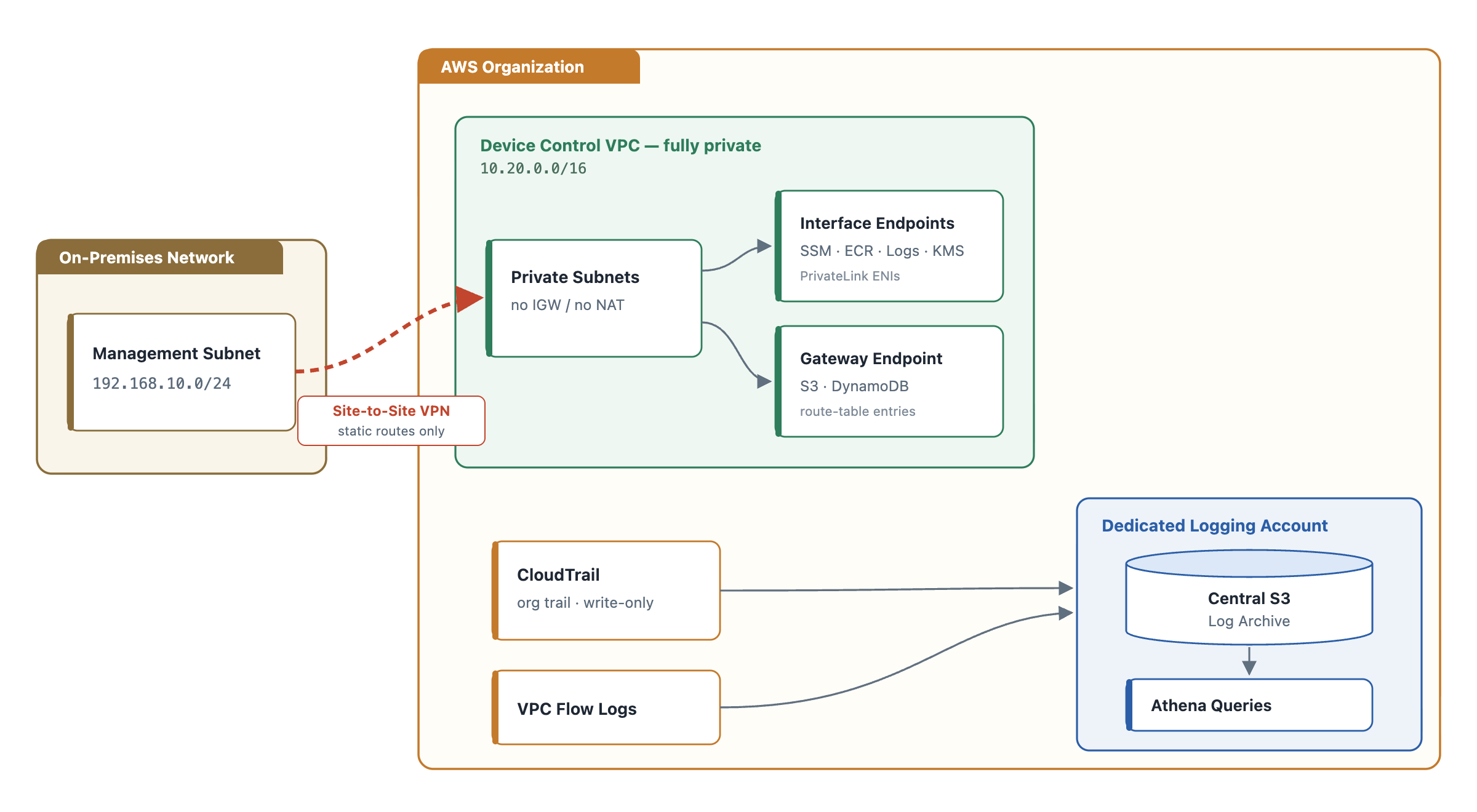
Architecture Overview
The core idea is a fully private blast-radius-contained network: the components that talk to customer devices live in their own VPC with no path to the public internet, on-prem access is limited to a single tunnel with static routes, and every account ships its audit trail to one hardened logging account.
Infrastructure Security
The foundation of a secure AWS environment is the network it runs on. For this project we segregated everything that controls customer devices into dedicated VPCs, and we made those VPCs completely private — no internet gateway, no NAT gateway, no route to 0.0.0.0/0. If there's no egress path, an attacker who lands inside has nowhere to phone home.
The absence of an IGW/NAT is the important part, so the Terraform is defined by what it doesn't contain:
resource "aws_vpc" "device_control" {
  cidr_block           = "10.20.0.0/16"
  enable_dns_support   = true
  enable_dns_hostnames = true
  tags                 = { Name = "device-control-vpc" }
}

resource "aws_subnet" "private" {
  for_each          = var.private_subnets
  vpc_id            = aws_vpc.device_control.id
  cidr_block        = each.value.cidr
  availability_zone = each.value.az
  tags              = { Name = "device-control-private-${each.key}" }
}

# Deliberately no aws_internet_gateway and no aws_nat_gateway.
# The private route tables carry local routes only — nothing to 0.0.0.0/0.
resource "aws_route_table" "private" {
  for_each = aws_subnet.private
  vpc_id   = aws_vpc.device_control.id
  tags     = { Name = "device-control-private-rt-${each.key}" }
}
Reaching AWS services without leaving the VPC
Cutting off the internet means the usual paths to AWS APIs (SSM for management, ECR for images, CloudWatch Logs, KMS) are gone too. We restored them with VPC endpoints — interface endpoints (PrivateLink ENIs) for most services and a gateway endpoint for S3 and DynamoDB — so all AWS traffic stays on the AWS backbone and never touches a public network.
locals {
  interface_endpoints = [
    "com.amazonaws.${var.region}.ssm",
    "com.amazonaws.${var.region}.ssmmessages",
    "com.amazonaws.${var.region}.ec2messages",
    "com.amazonaws.${var.region}.ecr.api",
    "com.amazonaws.${var.region}.ecr.dkr",
    "com.amazonaws.${var.region}.logs",
    "com.amazonaws.${var.region}.kms",
  ]
}

resource "aws_security_group" "vpce" {
  name_prefix = "vpce-"
  vpc_id      = aws_vpc.device_control.id

  # Only VPC-internal hosts may reach the endpoints, on 443.
  ingress {
    from_port   = 443
    to_port     = 443
    protocol    = "tcp"
    cidr_blocks = [aws_vpc.device_control.cidr_block]
  }
}

resource "aws_vpc_endpoint" "interface" {
  for_each            = toset(local.interface_endpoints)
  vpc_id              = aws_vpc.device_control.id
  service_name        = each.value
  vpc_endpoint_type   = "Interface"
  subnet_ids          = [for s in aws_subnet.private : s.id]
  security_group_ids  = [aws_security_group.vpce.id]
  private_dns_enabled = true
}

# S3 and DynamoDB use gateway endpoints (route-table entries, no ENI cost).
resource "aws_vpc_endpoint" "s3" {
  vpc_id            = aws_vpc.device_control.id
  service_name      = "com.amazonaws.${var.region}.s3"
  vpc_endpoint_type = "Gateway"
  route_table_ids   = [for rt in aws_route_table.private : rt.id]
}
Connecting on-prem without widening the surface
The client's on-premises network reaches AWS over a Site-to-Site VPN. The hardening detail here is static_routes_only plus an explicit route for the single management subnet that legitimately needs to talk to AWS — not the whole corporate range. Every subnet you don't advertise is an attack path you never opened.
resource "aws_customer_gateway" "onprem" {
  bgp_asn    = 65000
  ip_address = var.onprem_public_ip
  type       = "ipsec.1"
}

resource "aws_vpn_gateway" "vgw" {
  vpc_id = aws_vpc.device_control.id
}

resource "aws_vpn_connection" "onprem" {
  customer_gateway_id = aws_customer_gateway.onprem.id
  vpn_gateway_id      = aws_vpn_gateway.vgw.id
  type                = "ipsec.1"
  static_routes_only  = true
}

# Only the management subnet is reachable across the tunnel.
resource "aws_vpn_connection_route" "onprem_mgmt" {
  destination_cidr_block = "192.168.10.0/24"
  vpn_connection_id      = aws_vpn_connection.onprem.id
}
IAM Security
IAM decides what any entity may do to any resource, so it's where over-provisioning quietly accumulates. Our audit reviewed every role and policy against a least-privilege baseline — permissions scoped to specific resources and gated by conditions, rather than broad Action: "*" grants.
A representative policy: read access to device configuration, narrowed to the caller's own device group (via a principal tag) and locked to a single account.
{
  "Version": "2012-10-17",
  "Statement": [
    {
      "Sid": "ReadOwnDeviceConfig",
      "Effect": "Allow",
      "Action": ["s3:GetObject"],
      "Resource": "arn:aws:s3:::device-config-bucket/${aws:PrincipalTag/deviceGroup}/*",
      "Condition": {
        "StringEquals": { "aws:PrincipalAccount": "111122223333" }
      }
    }
  ]
}
Finding what's unused
To catch dead roles and redundant permissions we leaned on IAM Access Analyzer's unused-access findings, run at the organization level so a single analyzer covers every account.
# Create an org-wide analyzer that flags access unused for 90+ days.
aws accessanalyzer create-analyzer \
  --analyzer-name unused-access-org \
  --type ORGANIZATION_UNUSED_ACCESS \
  --configuration '{"unusedAccess":{"unusedAccessAge":90}}'

# List unused roles and unused permissions.
aws accessanalyzer list-findings-v2 \
  --analyzer-arn "$ANALYZER_ARN" \
  --filter '{"findingType":{"eq":["UnusedIAMRole","UnusedPermission"]}}' \
  --query 'findings[].{Resource:resource,Type:findingType,Status:status}' \
  --output table
The findings were most prolific in the development environment and minimal in higher environments — as expected, since all policies, permissions, and resources in staging and prod are provisioned through automation. One caveat worth calling out in any report: roles used by automation can surface as "unused" if the automation runs less often than the analyzer's lookback window, so unused findings need a human read before you delete anything. In practice, the vast majority of what we flagged had been created or assigned manually.
Logging
Centralized logging is what lets you detect a threat in real time and reconstruct impact after the fact. We enabled CloudTrail across every account and consolidated it into a single S3 bucket in a dedicated logging account, so audit data lives outside the accounts it's auditing.
An organization trail captures every member account in one place. To control cost, we set the event selector to write-only — the operations that change state, which is what matters for security, without paying to store high-volume read events.
resource "aws_cloudtrail" "org" {
  name                          = "org-write-trail"
  s3_bucket_name                = aws_s3_bucket.log_archive.id
  is_organization_trail         = true
  is_multi_region_trail         = true
  include_global_service_events = true
  enable_log_file_validation    = true

  event_selector {
    read_write_type           = "WriteOnly"
    include_management_events = true
  }
}
Querying the trail with Athena
With logs in S3, Athena turns the archive into something you can interrogate in SQL. Point a table at the CloudTrail prefix (the console can generate the CloudTrail SerDe DDL for you, ideally with partition projection on region/date), then hunt for the events that matter. This query surfaces failed console logins and any use of the root identity in the last week — two classic early signals of trouble:
SELECT
    eventtime,
    useridentity.arn        AS principal,
    sourceipaddress,
    eventname,
    errorcode
FROM cloudtrail_logs
WHERE from_iso8601_timestamp(eventtime) > current_timestamp - interval '7' day
  AND (
        (eventname = 'ConsoleLogin' AND errorcode IS NOT NULL)   -- failed sign-ins
     OR  useridentity.type = 'Root'                              -- any root activity
  )
ORDER BY eventtime DESC;
Watching the network
We also enabled VPC Flow Logs to record inter-VPC traffic. In an environment that's supposed to have no internet egress, flow logs make anomalies obvious — a rejected flow toward an unexpected destination is a signal, not noise.
resource "aws_flow_log" "device_control" {
  vpc_id                   = aws_vpc.device_control.id
  traffic_type             = "ALL"
  log_destination_type     = "s3"
  log_destination          = "${aws_s3_bucket.log_archive.arn}/vpc-flow-logs/"
  max_aggregation_interval = 60
}
What's next: from passive logs to active alerts
Logging today is largely investigative — the data is there when you go looking. The next step is making it proactive with metric filters and alarms that page someone automatically. The pattern below (aligned with the CIS AWS Foundations Benchmark) fires the moment the root account is used:
resource "aws_cloudwatch_log_metric_filter" "root_usage" {
  name           = "root-account-usage"
  log_group_name = aws_cloudwatch_log_group.cloudtrail.name
  pattern        = "{ $.userIdentity.type = \"Root\" && $.userIdentity.invokedBy NOT EXISTS && $.eventType != \"AwsServiceEvent\" }"

  metric_transformation {
    name      = "RootAccountUsage"
    namespace = "SecurityMetrics"
    value     = "1"
  }
}

resource "aws_cloudwatch_metric_alarm" "root_usage" {
  alarm_name          = "root-account-usage"
  namespace           = "SecurityMetrics"
  metric_name         = "RootAccountUsage"
  statistic           = "Sum"
  period              = 300
  evaluation_periods  = 1
  threshold           = 1
  comparison_operator = "GreaterThanOrEqualToThreshold"
  alarm_actions       = [aws_sns_topic.security_alerts.arn]
}
The same shape — metric filter plus alarm plus SNS — extends to unauthorized API calls, IAM policy changes, security-group edits, and disabled CloudTrail, giving you a library of tripwires on top of the raw log store.
Conclusion
Securing an AWS environment is a multifaceted effort: harden the network so there's nowhere to hide and nowhere to escape, manage permissions so every identity has exactly what it needs and nothing more, and log comprehensively so you can both detect and reconstruct. None of it is one-and-done. Roles drift, automation changes, and new services introduce new surfaces — which is why continuous auditing of each layer matters more than any single fix. Security is a posture, not a milestone: stay proactive to shrink both the likelihood and the blast radius of an incident, and have the tooling in place to respond fast when one happens anyway.


